Address
E-Learning
Worldwilde
Address
E-Learning
Worldwilde


Learn how to master your Meta Conversions CAPI setup using Stape.io to track e-commerce and service-based events.
If you’re running Meta (Facebook) ads and feel like your tracking numbers don’t match reality, you’re not alone.
Since 2021, browser privacy updates and cookie restrictions have quietly killed accurate tracking. Businesses are losing up to 30 % of their conversion data — which means you’re likely under-reporting your real results and making ad decisions blindfolded.
That’s where the Meta Conversions CAPI setup using Stape.io comes in.
Instead of relying only on the browser pixel, this system sends events directly from your server — making your tracking more accurate, private, and reliable. Whether you sell physical products or service packages, CAPI ensures Meta sees your true ROI.

Let’s face it — the old way of tracking with a simple Meta Pixel installed on your site is broken.
Browser-side tracking depends on cookies and user consent. Every time a user blocks cookies, uses Safari’s privacy mode, or rejects tracking pop-ups, your data disappears.
What that means for you:
Your ad manager says “no conversions,” but your Stripe or booking calendar tells another story. The disconnect is huge.
That’s why smart marketers are upgrading to server-side tracking — and Stape.io makes it dead simple.
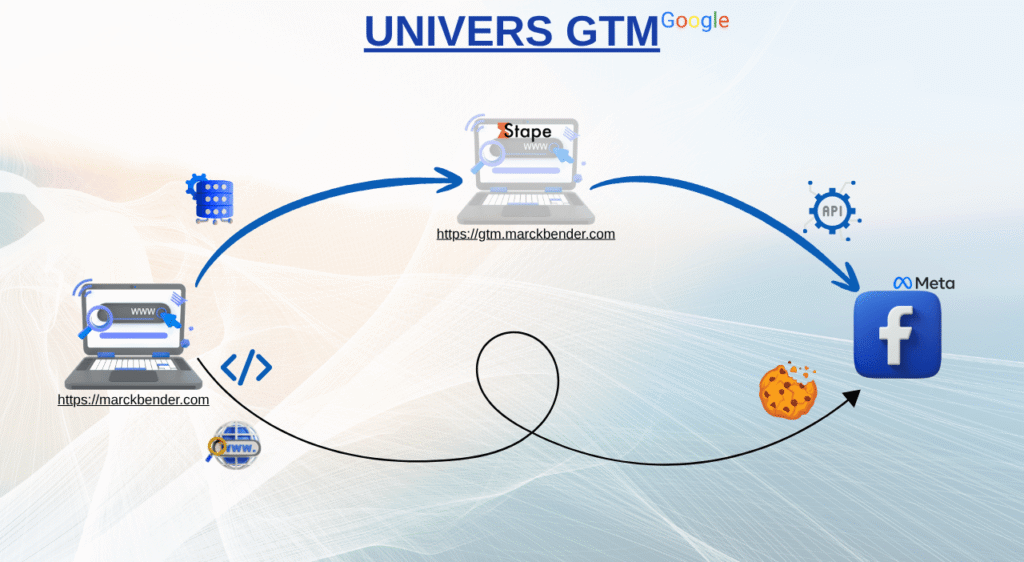
Meta’s Conversions API (CAPI) connects your website or backend directly to Meta’s servers.
It allows you to send event data (like Purchase, Lead, or Schedule Submit) even if the browser can’t.
Here’s what it improves:
Instead of sending signals through the “window” (browser), you send them through the “foundation” (server). That’s why CAPI + browser pixel = the perfect combo for 2025.
Implementing Meta Conversions CAPI manually can be complex — server hosting, API tokens, GTM containers, and so on.
But Stape.io removes all the friction.
Stape.io is a managed server-side tagging platform designed for marketers and agencies who don’t want to touch code.
What Stape lets you do:
Whether you’re an e-commerce brand tracking “Purchase” events or a coach tracking “Schedule Submit,” Stape.io handles it all with reliability and speed.
If you sell physical or digital products, track:
PageView – product page visitAddToCart – when a user adds an itemInitiateCheckout – checkout startPurchase – successful paymentEach event should include value, currency, and content IDs so Meta can match sales to ad clicks accurately.
If you run a coaching, consulting, or lead-generation business, focus on:
Lead – form submissionScheduleSubmit – booking a call via Calendly or YouCanBookMeCompleteRegistration – sign-up for a free training or masterclassThese events help Meta understand your funnel from ad click → form submit → booked call.
With Stape.io, you can push these events to Meta CAPI without touching your site’s code.
Purchase, ScheduleSubmit) and enable event matching.Once done, you’ll see higher match quality and more accurate reporting inside Ads Manager — meaning you finally see the results you deserve.
Even a perfect system can fail if you miss these details:
Pro tip: Use Deadline Funnel or Mautic alongside Stape to sync your server-side data with email follow-ups and build a complete conversion system.
Server-side tracking is no longer a luxury — it’s a necessity.
Whether you run ads for your own business or help clients build systems they own, a proper Meta Conversions CAPI setup via Stape.io can cut costs, boost performance, and protect your data in the long run.
🎁 Ready to build your lean tracking system?
👉 Visit our store to learn how to set up Meta CAPI, Stape.io, and server-side Google Tag Manager the right way — without coding or guessing.
Take control of your data. Own your system. And watch your ad performance skyrocket with clarity and confidence.
More FREE resources you can read about the topic: Meta Conversion Tracking, or Book a call so we can do it for you here.
📩 Want to stay updated?
Join our free community and get notified when new tutorials, strategies, and resources drop.