Facebook Conversion API Setup 🔥
Are your Facebook Ads underperforming despite significant spend? In today’s privacy-focused digital landscape, relying solely on the traditional Facebook Pixel is like trying to catch water with a sieve. iOS updates, ad blockers, and browser restrictions are causing massive data loss, leading to wasted ad spend, inaccurate reporting, and suboptimal campaign performance.
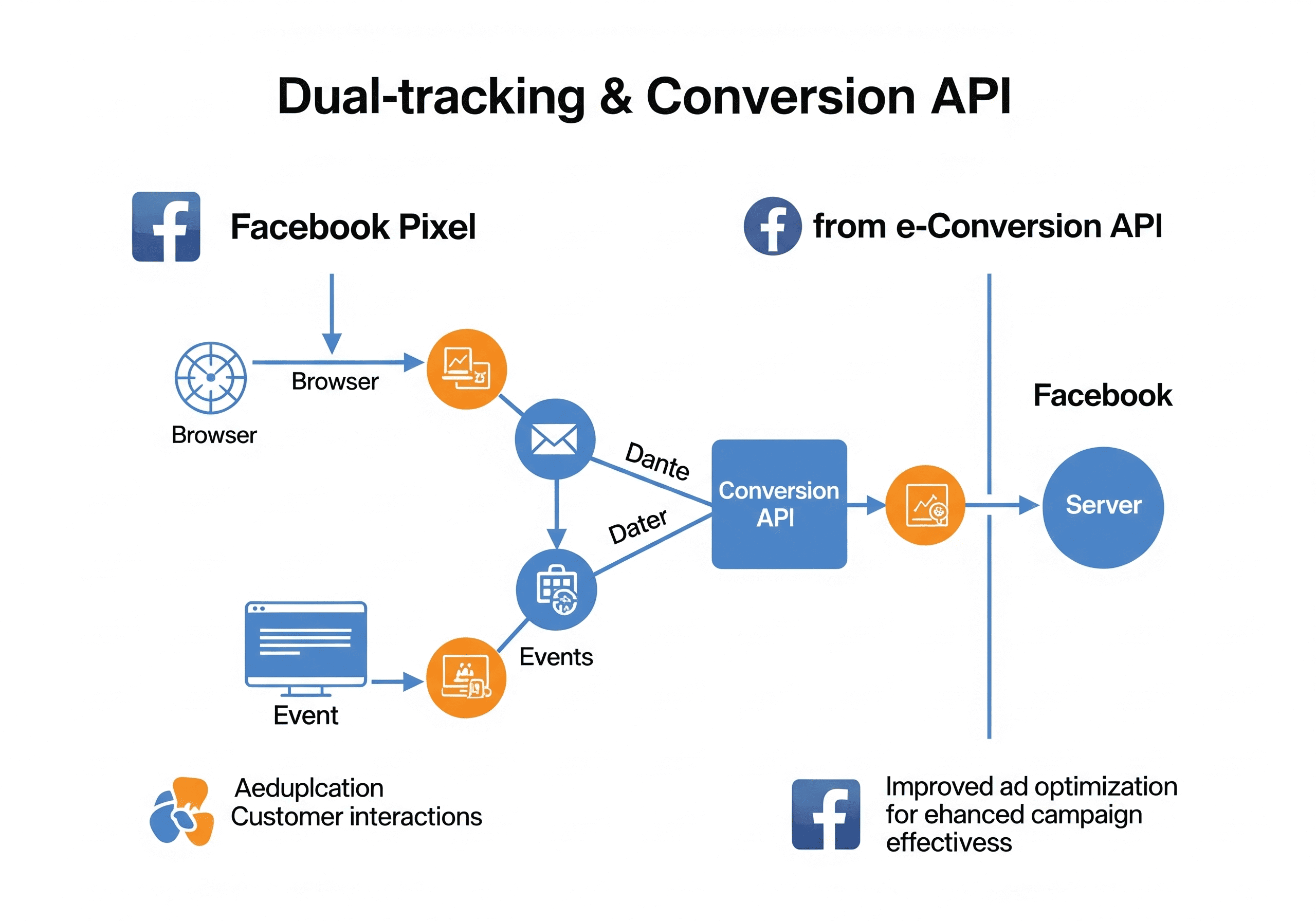
The solution? A robust and resilient tracking strategy combining the Facebook Pixel with the Facebook Conversion API (CAPI). This comprehensive guide will walk you through the essential steps to implement a dual-tracking setup, ensuring you capture 100% of your conversions and supercharge your ad optimization.
Table of Contents
- The Tracking Crisis: Why Your Facebook Pixel Isn’t Enough Anymore 🚫
- Enter Facebook Conversion API Setup: The Solution for Flawless Tracking 🚀
- Setting the Stage: Google Tag Manager (GTM) Essentials 🛠️
- Browser-Side Brilliance: Configuring Facebook Pixel Events via GTM 💻
- Server-Side Mastery: Implementing Facebook Conversion API Setup ☁️
- Why This Dual Approach is Non-Negotiable for E-commerce Success ✅
- Ready to Master Your Tracking? 💡
1. The Tracking Crisis: Why Your Facebook Pixel Isn’t Enough Anymore 🚫
For years, the Facebook Pixel was the gold standard for tracking website actions and optimizing ad campaigns. However, recent privacy changes (like Apple’s iOS 14.5 updates), increasing use of ad blockers, and browser cookie restrictions have significantly curtailed its effectiveness.
- Lost Conversions: The pixel often misses a significant percentage of actual conversions.
- Poor Ad Optimization: Facebook’s algorithms receive incomplete data, hindering their ability to find the right audience.
- Wasted Ad Spend: You might be spending money on ads that appear to underperform, when in reality, conversions aren’t being tracked.
This means you’re running blind, leaving massive ROI on the table.
2. Enter Facebook Conversion API Setup: The Solution for Flawless Tracking 🚀
The Facebook Conversion API (CAPI) is Meta’s answer to these tracking challenges. Unlike the browser-based Pixel, CAPI sends conversion data directly from your server to Facebook.
- Bypasses Restrictions: It isn’t affected by ad blockers, cookie restrictions, or iOS privacy settings.
- Captures 100% Conversions: Ensures every conversion is accurately recorded.
- Richer Data: Provides Facebook with more comprehensive data, leading to better audience matching, more precise targeting, and ultimately, higher ad ROI.
- Data Deduplication: When used with the Pixel, CAPI ensures events aren’t double-counted, providing the most accurate single source of truth.
Combining the Pixel (browser-side) with CAPI (server-side) creates a robust, future-proof tracking system.
3. Setting the Stage: Google Tag Manager (GTM) Essentials 🛠️
Google Tag Manager is a powerful, free tool that allows you to manage all your website tags (like Facebook Pixel and Analytics) without directly editing your website code. It’s crucial for a clean and efficient Facebook Conversion API setup.
- Create a GTM Account: Set up a new container for your website.
- Connect to Your Website: Add the GTM code snippets to your website’s header and body.
- Enable Data Layer: Ensure your website’s data layer is correctly configured, especially for e-commerce, to pass valuable event data (product IDs, prices, quantities, user info) to GTM.
4. Browser-Side Brilliance: Configuring Facebook Pixel Events via GTM 💻
Even with CAPI, the Facebook Pixel remains vital for certain browser-specific signals. Here’s how to set up key e-commerce events in GTM:
- Page View: Fires on every page load.
- View Content: Fires when a product page is viewed, passing product details.
- Add to Cart: Fires when an item is added to the cart, sending product and value data.
- Initiate Checkout: Fires when a user begins the checkout process.
- Purchase: The most critical event, fires upon successful order completion, sending order value, currency, and product details.
For all events, crucial for optimization, enable Advanced Matching. This passes hashed customer data (email, name, phone) to Facebook, significantly improving match rates and attribution accuracy.
5. Server-Side Mastery: Implementing Facebook Conversion API Setup ☁️
This is where you unlock the full power of resilient tracking.
- Google Analytics 4 (GA4) for Server-Side: GA4 is designed with event-based data collection in mind, making it an excellent source for server-side data. Set up your GA4 property and integrate it with GTM.
- Server Container (e.g., Stape.io): A server container acts as an intermediary, receiving data from your website and sending it to Facebook’s servers. Platforms like Stape.io offer a streamlined way to set this up, including custom domains for enhanced data quality.
- Configure Server-Side CAPI Tags:
- For each standard event (Page View, View Content, Add to Cart, Initiate Checkout, Purchase), create a corresponding server-side tag in your server container.
- Crucially, for each event, include an
event_id parameter. This unique identifier allows Facebook to deduplicate events received from both the browser Pixel and the server-side CAPI, ensuring accurate reporting.
- Pass all relevant user properties and event parameters (e.g.,
value, currency, content_ids, content_type, advanced_matching_parameters).
6. Why This Dual Approach is Non-Negotiable for E-commerce Success ✅
Implementing both Facebook Pixel and Facebook Conversion API Setup creates a robust, redundant, and highly accurate tracking system.
- Complete Data Capture: You won’t miss conversions due to browser limitations or ad blockers.
- Improved Ad Performance: Facebook’s algorithms receive richer, more reliable data, leading to better optimization, lower CPA, and higher ROI.
- Accurate Attribution: Understand the true impact of your ad spend.
- Future-Proofing: Stay ahead of evolving privacy regulations and tracking challenges.
This dual strategy empowers e-commerce brands to make data-driven decisions with confidence, maximizing their ad effectiveness and scaling their business.
7. Ready to Master Your Tracking? 💡
The world of digital advertising is constantly changing, but with a solid Facebook Conversion API setup, you can ensure your e-commerce brand has the foundational data it needs to thrive. Don’t let valuable conversions slip through the cracks.
✅ Take Your Action
💡 Want a ready-to-launch funnel with tracking, nurturing, and email automation all done for you?
👉 Book a strategy call now or grab our watch our funnel here
What’s the biggest tracking challenge your e-commerce business faces right now? Share your thoughts in the comments below!
📩 Want to stay updated?
Join our free community and get notified when new tutorials, strategies, and resources drop.